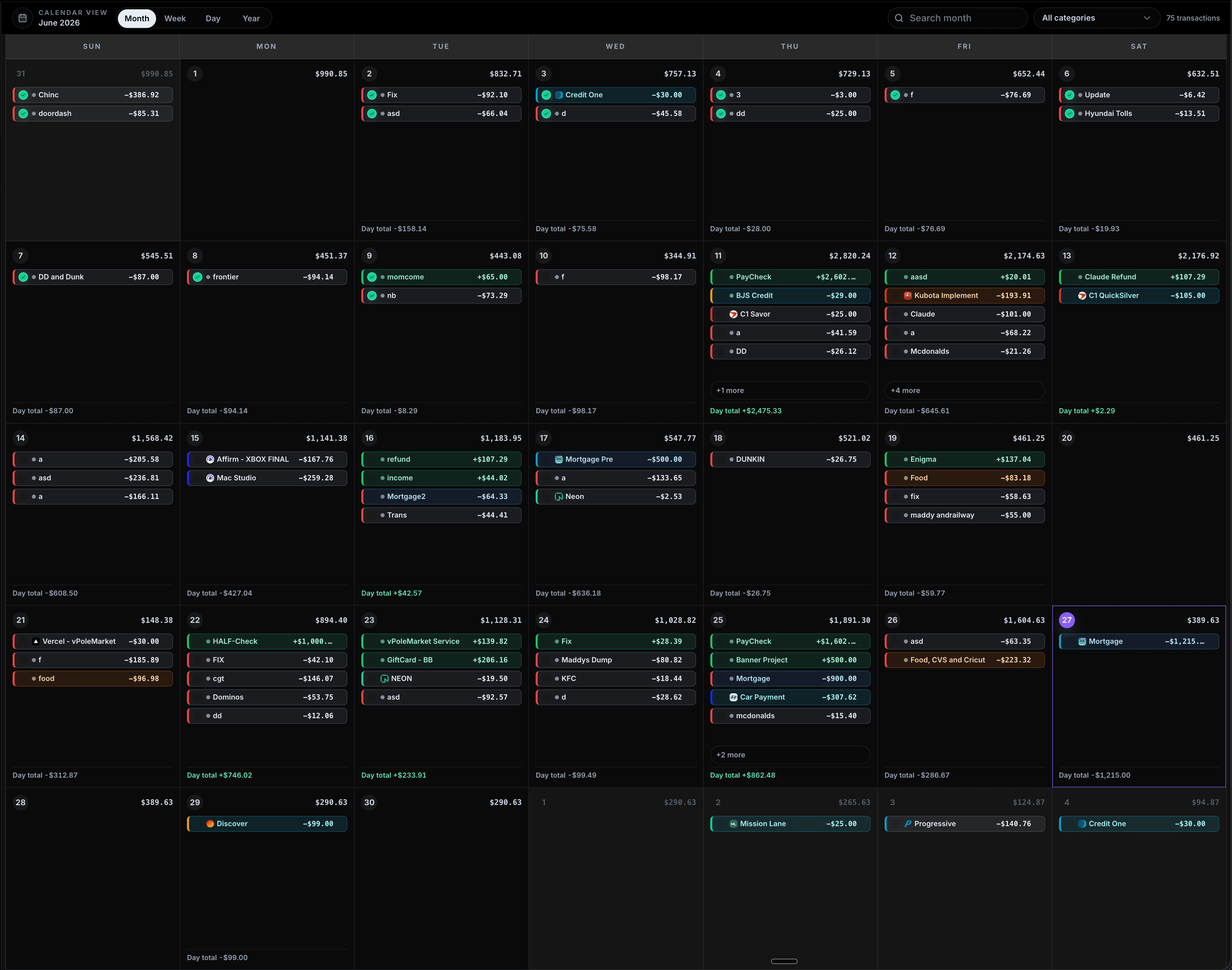
Know your lowest future balance before the month gets loud.
CalBudget maps bills, paychecks, subscriptions, debt payments, and planned spending onto a calendar, then shows the balance each future day is expected to leave behind.
Drag a transaction, or select one and move it by day.
Select a transaction, then move it by day or choose a calendar day.
Bank logins required
0
Manual-first by design
Free plan
$0
Build a first forecast
Plus monthly
$2.99
Unlimited planning
Available on iPhone
iOS
App Store live
Why budget apps miss the moment
The problem is timing, not just spending.
A category budget tells you where money went. A calendar budget shows whether the account survives the days between paychecks.
Totals hide tight days
Category budgets can look healthy while the account gets squeezed between rent, groceries, and the next deposit.
Timing becomes visible
Every bill, paycheck, subscription, and planned purchase sits on the date it actually changes your balance.
Plans are easy to adjust
Drag a transaction, shift a payment, and see the projected balance change without rebuilding a spreadsheet.
The forecast is the point
CalBudget looks forward, so you can spot the lowest future day before the bank app tells you what already happened.
Product proof
The calendar is the decision surface.
A budget should help before the account is short. CalBudget lets you move dates, review recurring charges, and see reports without losing the month view.
Every transaction on the day it happens. Daily running balance, drag to reschedule.
- Housing51%
- Bills17%
- Auto14%
- Food12%
Where your money actually went. Category breakdowns and month-over-month trends.
- Rmonthly-$1,850next: Apr 1
- $biweekly+$3,240next: Apr 5
- Cmonthly-$387next: Apr 13
- Smonthly-$12next: Apr 3
- Nmonthly-$16next: Apr 15
- Gmonthly-$30next: Apr 10
- Imonthly-$156next: Apr 28
Set bills and paychecks once. They auto-fill every future month for you.
Desktop apps
Keep the calendar open on Mac or Windows.
The desktop app skips the marketing page and opens CalBudget directly into the product flow. Sign in once, then use the calendar as a quiet planning workspace.
Mac
Download for macOS
Open CalBudget as a focused desktop app with the calendar as the first screen after sign in.
macOS app, signed for local testing
Windows
Download for Windows
Install CalBudget on Windows and jump straight into login, then your calendar forecast.
NSIS installer for Windows 10+
Interactive planning
Change the plan and see the low point move.
Try the same job CalBudget is built for: move a payment, lower a spending plan, add debt payoff, and watch the projected balance react.
1. Start with today
Enter the balance you actually have right now. That becomes the anchor for the month.
2. Place what is coming
Put paychecks, bills, subscriptions, debt payments, and planned spending on the dates they land.
3. Find the tight day
CalBudget carries the balance forward so the lowest future day is visible before it becomes stressful.
4. Move the plan
Shift a payment, drag a transaction, or adjust a purchase and watch the calendar update with it.
Scenario planner
What happens if the month changes?
-$10
Day 1
$4,885
Projected
$3,045
Income minus outflow
Day 1 dips below the $500 cushion. Move a bill or trim flexible spending.
Everything points back to the calendar
Built for planning, not financial theater.
Calendar-first forecasting
A future balance for each day, not a category total that only makes sense after the month ends.
Recurring bills and income
Set predictable items once and keep future months filled without spreadsheet upkeep.
Reports when you need them
Plus adds category reports and trend views without turning the product into a finance cockpit.
CSV and statement import
Use history to find recurring schedules. CalBudget helps review patterns instead of dumping noise.
Private by default
No bank credentials required. You decide what goes into the calendar.
Pricing
Start free. Upgrade when your calendar needs more room.
There are two plans: Free and Plus. Monthly and annual are the same Plus access with different billing intervals.
Free
For building your first forecast.
- 1 calendar workspace
- 1 account
- 50 lifetime transactions
- 5 recurring series
- 3 bookmarks
- Manual transactions
- Basic categories
- Daily balance forecast
CalBudget Plus
Unlimited planning, imports, reports, debt tools, AI insights, and full web plus iOS access.
Equivalent to $2.50/mo. Save $5.89 per year.
- Unlimited accounts
- Unlimited transactions
- Unlimited recurring series
- Unlimited bookmarks
- CSV and statement import
- Reports and category trends
- Debt planning tools
- AI insights
- Web and iOS access
Questions
Clear answers before you commit.
Start with the calendar for free. Upgrade only when you want unlimited room, imports, reports, debt tools, and deeper planning features.
Do I need to connect my bank account?
No. CalBudget is manual-first. You enter your balance and planned transactions yourself, and you can upload statement exports to detect recurring schedules when history helps.
How much does it cost?
CalBudget has a Free plan. Upgrade to CalBudget Plus for unlimited planning at $2.99 per month or $29.99 per year.
What is included with Free?
Free includes one calendar, manual transactions, basic forecasting, and enough room to build your first cash-flow plan. Plus removes limits and adds imports, reports, debt planning, and AI insights.
Does it work on iPhone?
Yes. CalBudget works in a mobile browser and is available on the App Store for iPhone and iPad.
Can I cancel any time?
Yes. You can cancel your subscription any time, and you will keep access through the end of the billing period you already paid for.
What does future daily balance mean?
It is the projected balance for each calendar day after that day's bills, income, and planned spending clear. It turns "will I have enough?" into something you can answer before the day arrives.
Is this just a spreadsheet?
It solves the same cash-flow forecasting job people often build in spreadsheets, but the calendar, recurring rules, running balance math, and rescheduling workflow are built in.
Does it work for irregular income or biweekly pay?
Yes. Add expected income on the dates you expect it, then update the amount or date when reality changes. The forecast is a working plan, not a promise.
Can I track more than one account?
Yes. You can create multiple accounts and switch between their calendars, balances, reports, and transaction history.
How do recurring transactions work?
Set a frequency such as weekly, biweekly, twice monthly, monthly, or yearly, and CalBudget creates future occurrences so your calendar stays forecastable.
Can CalBudget help me pay down debt?
CalBudget helps you schedule minimums and extra payments against your real cash-flow calendar. It does not give financial advice, but it makes the timing impact visible.
Can I import transactions from a CSV file?
You can upload CSV statement history to find recurring bills and income. CalBudget creates reviewed recurring schedules, not a bulk copy of every statement row.
Does CalBudget give financial advice?
No. CalBudget is a planning and tracking tool, not a financial advisor. It helps organize your information so you can make your own decisions.
Trust, sources, and methodology
The financial timing problem CalBudget is built around
CalBudget is built around a simple timing problem: known money in, known money out, and the daily balance between them. These sources give readers clear context for the banking, subscription, and cash-buffer claims on this page.
Attributed source language
The CFPB defines an overdraft as when you "don't have enough money" for a transaction and the bank pays it anyway.
CalBudget uses that category context to focus on timing visibility. It does not replace a bank statement, financial advice, or legal guidance.
CFPB overdraft definitionOverdraft timing
The CFPB describes an overdraft as a transaction paid when the account does not have enough money. CalBudget focuses on seeing low-balance days before they happen.
CFPB overdraft definitionPrescheduled payments
The CFPB tells consumers to know when prescheduled transfers such as rent, mortgage payments, or utility bills will be paid and how much they will be.
CFPB overdraft optionsRecurring subscriptions
The FTC click-to-cancel rule is category context for why recurring charges should be easy to see, manage, and cancel.
FTC recurring subscription ruleCash buffer pressure
The Federal Reserve reported that 63% of adults could cover a hypothetical $400 emergency expense with cash or its equivalent in 2024.
Federal Reserve household reportCalBudget methodology snapshot
Product facts stated plainly for comparison.
| Entity | CalBudget calendar budget app |
|---|---|
| Core calculation | Starting balance plus dated income minus dated expenses |
| Forecast unit | One projected balance per calendar day |
| Required bank login | 0 |
| Free price | $0 |
| Plus Monthly price | $2.99 |
| Plus Annual price | $29.99 |
Public CalBudget entity links
These are reachable public pages for company context, support, marketplace discovery, and developer visibility.
Build a calendar that tells you the truth before your bank app does.
Start with one account, today's balance, and the next few bills. The first useful forecast takes minutes.