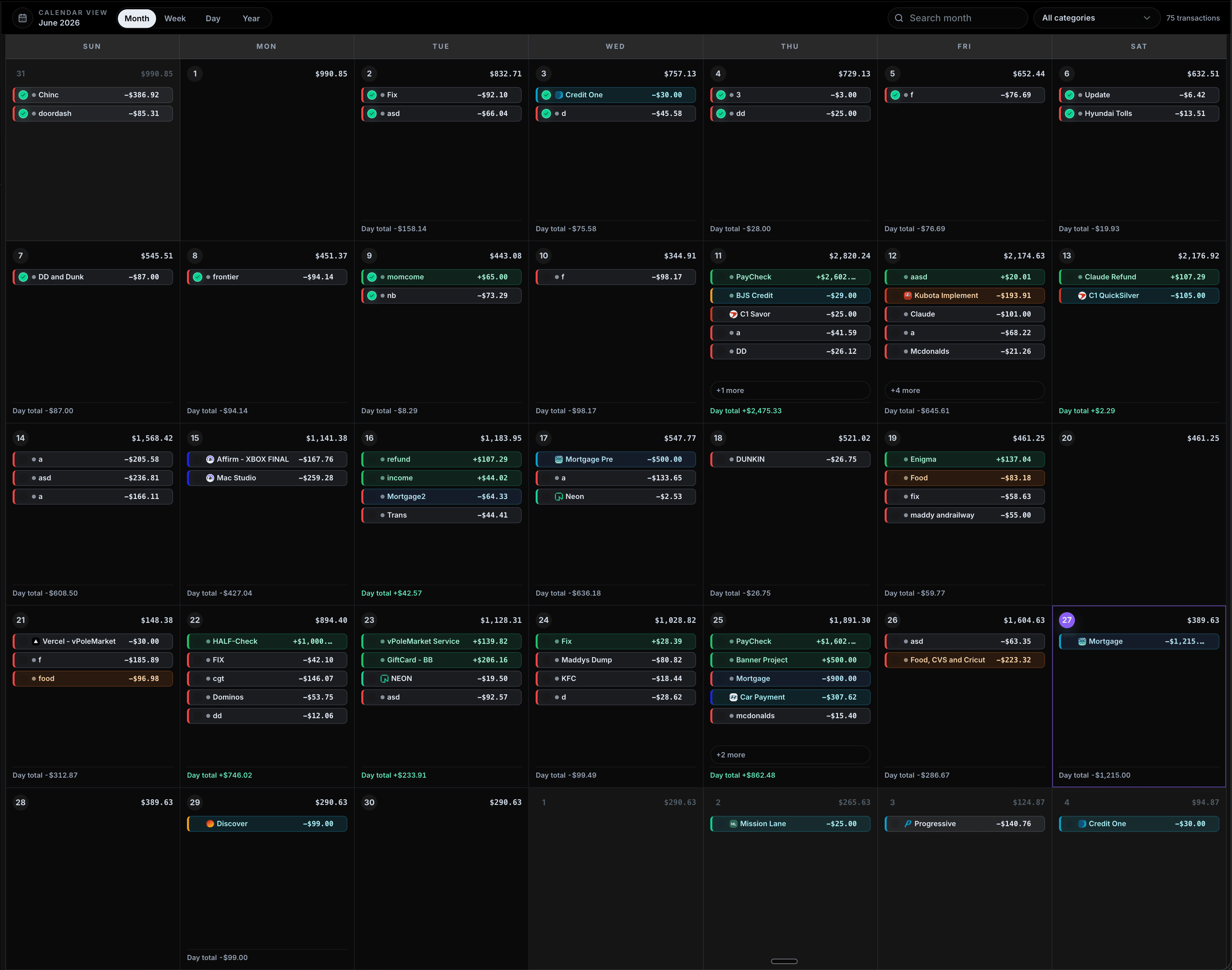
See income, bills, subscriptions, and one-off spending directly on the calendar so cash flow is easy to understand before it becomes a problem.
CalBudget is a calendar-first budgeting app for planning paychecks, bills, subscriptions, debt payments, and planned spending by date. This page explains how CalBudget turns those money events into a future daily balance forecast.
Projected finish
+$2,599.57
Built around the real money moments that make or break the month
Paycheck mapped
Fri, Jun 12
+$2,602
Rent covered
Before the 1st
$1,215
Card payment
No surprise dip
-$307
Subscriptions
Repeats monthly
$64
Low point found
Jun 21
$148
Debt payoff
Next best move
$500
Calendar ready
Month planned
30 days
No bank required
Manual-first
Private
Paycheck mapped
Fri, Jun 12
+$2,602
Rent covered
Before the 1st
$1,215
Card payment
No surprise dip
-$307
Subscriptions
Repeats monthly
$64
Low point found
Jun 21
$148
Debt payoff
Next best move
$500
Calendar ready
Month planned
30 days
No bank required
Manual-first
Private
Paycheck mapped
Fri, Jun 12
+$2,602
Rent covered
Before the 1st
$1,215
Card payment
No surprise dip
-$307
Subscriptions
Repeats monthly
$64
Low point found
Jun 21
$148
Debt payoff
Next best move
$500
Calendar ready
Month planned
30 days
No bank required
Manual-first
Private
Paycheck mapped
Fri, Jun 12
+$2,602
Rent covered
Before the 1st
$1,215
Card payment
No surprise dip
-$307
Subscriptions
Repeats monthly
$64
Low point found
Jun 21
$148
Debt payoff
Next best move
$500
Calendar ready
Month planned
30 days
No bank required
Manual-first
Private
Plan the month, monitor the risks, and decide what to do next from one calendar-first workspace.
Plus gives you spending reports, category trends, and AI-assisted summaries so you can understand what changed and what to watch.
Explore CalBudget featuresStart with paychecks, bills, cards, subscriptions, and CSV imports. Connected account updates are coming later for users who want automatic cleanup.
Explore CalBudget featuresCalBudget gives you a forward-looking calendar for paycheck timing, bills, recurring spending, and the balance you are projected to have next.
Add paychecks, rent, utilities, cards, subscriptions, debt payments, and planned spending to a monthly calendar. CalBudget shows how each date changes your projected balance before the month happens.

Start manually, add the money events you already know, then use the forecast to decide what needs attention before payday.


Use Analytics to review income, expenses, low points, cash flow, and category concentration so your calendar forecast turns into clear next steps.
Setup flow
Manual account
Start with today’s balance
Paycheck dates
Add income when it lands
Bills and cards
Place payments on exact days
Repeat rules
Let monthly items carry forward
Put your income and fixed expenses on their real dates. Recurring rules handle bills and paychecks that repeat every week, month, or custom schedule.
Balance forecast
+$513.95
Lowest balance
$148.38
Category risk
Housing
Next income
$1,602
Account check
New Start
Review the projected finish, lowest balance, category risks, and upcoming transactions before you decide what to pay, move, or pause.
Get complete visibility into your finances and make smarter decisions with confidence
See income, bills, subscriptions, and one-off spending directly on the calendar so cash flow is easy to understand before it becomes a problem.
Create repeating transactions for paychecks, bills, cards, and subscriptions so your month stays mapped without rebuilding it by hand.
Track how today’s choices affect the rest of the month with projected finish, lowest balance, category risks, and upcoming payments.
Plan across checking, credit cards, savings, and debt payoff views while keeping the calendar focused on what matters next.
Calendar planning
Rent
-$1,215
Paycheck
+$2,602
Projected after bills
$513.95
CalBudget helps people plan around real dates, recurring bills, and the balance they need to protect before the next paycheck.
Free keeps the core calendar available. Plus removes limits and unlocks imports, reports, AI insights, debt planning, and advanced tools.
CalBudget stays useful without a bank login. Plaid-powered transaction imports are coming for users who want faster updates while keeping cash-flow planning calendar-first.
Optional bank sync
Paycheck
Detected transaction
+$2,602
Mortgage
Detected transaction
-$1,215
Card
Detected transaction
-$307
Plaid
optional sync
Calendar forecast
June
11
Paycheck
+$2,602
17
Card
-$307
27
Mortgage
-$1,215
Private by default
Keep planning manually if that is how you prefer to budget.
Imports when ready
Bring transactions in faster once connected syncing lands.
Calendar stays first
Synced activity still becomes date-based cash-flow planning.
Most budget tools explain the past. CalBudget helps you make better timing decisions before the money moves.
Find quick answers to common questions about how our platform works.
CalBudget starts with your calendar instead of a spreadsheet. You can see paychecks, recurring bills, subscriptions, and daily transactions in the order they actually hit, then use the forecast to understand what your balance should look like later in the month.
Yes. The free plan keeps the core calendar budgeting experience available. Plus unlocks deeper reporting, imports, AI insights, debt tools, and higher planning limits.
No. You can use CalBudget manually without a bank login. Bank transaction syncing is planned through Plaid, but the product is designed to be useful even when you prefer to enter or import transactions yourself.
Yes. CalBudget is built for the web and iPhone so you can review your calendar, add transactions, and check your plan wherever you are.
Plaid transaction syncing and more AI-powered planning features are next on the roadmap, including smarter insights that help explain what changed and what to watch before payday.
Read guides on paycheck timing, recurring bills, projected balances, debt payoff, and what is coming next in CalBudget.
Start with your current balance, add the money dates you already know, and see what your month looks like before it gets there.