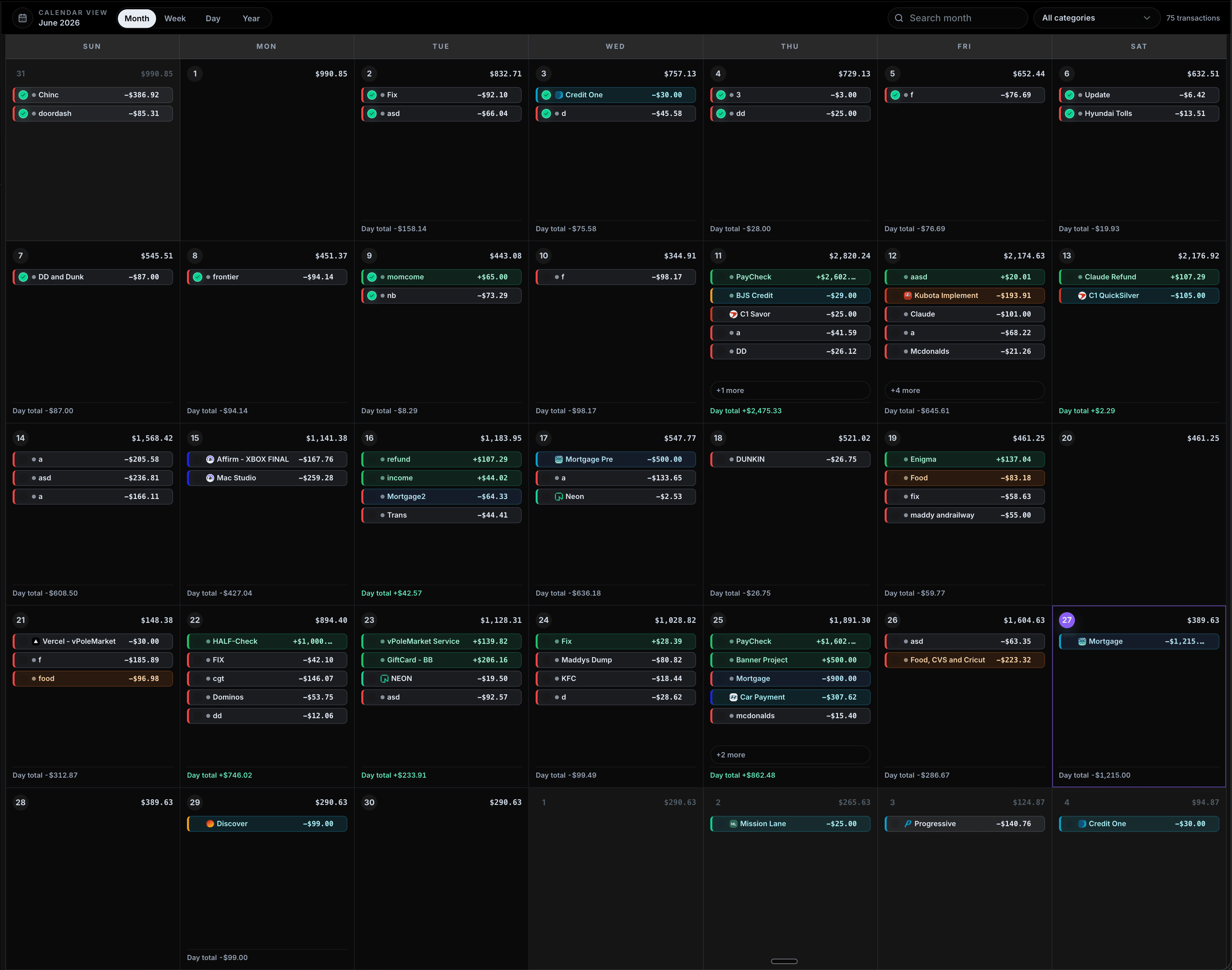
CalBudget is a calendar-first budgeting app for seeing how paychecks, bills, subscriptions, debt payments, and planned spending change your future daily balance. This page explains what CalBudget does, how budget calendar planning works, what the free and Plus plans include, and which trusted sources support dated cash-flow planning.

NewFree calendar budgeting is live

Know what your money will look like before it gets there

CalBudget is a calendar-first budgeting app for planning paychecks, bills, subscriptions, debt payments, and planned spending by date. This page explains how CalBudget turns those money events into a future daily balance forecast.

Built around the real money moments that make or break the month

Paycheck mapped

Fri, Jun 12

+$2,602

Rent covered

Before the 1st

$1,215

Card payment

No surprise dip

-$307

Subscriptions

Repeats monthly

$64

Low point found

Jun 21

$148

Debt payoff

Next best move

$500

Calendar ready

Month planned

30 days

No bank required

Manual-first

Private

Paycheck mapped

Fri, Jun 12

+$2,602

Rent covered

Before the 1st

$1,215

Card payment

No surprise dip

-$307

Subscriptions

Repeats monthly

$64

Low point found

Jun 21

$148

Debt payoff

Next best move

$500

Calendar ready

Month planned

30 days

No bank required

Manual-first

Private

Paycheck mapped

Fri, Jun 12

+$2,602

Rent covered

Before the 1st

$1,215

Card payment

No surprise dip

-$307

Subscriptions

Repeats monthly

$64

Low point found

Jun 21

$148

Debt payoff

Next best move

$500

Calendar ready

Month planned

30 days

No bank required

Manual-first

Private

Paycheck mapped

Fri, Jun 12

+$2,602

Rent covered

Before the 1st

$1,215

Card payment

No surprise dip

-$307

Subscriptions

Repeats monthly

$64

Low point found

Jun 21

$148

Debt payoff

Next best move

$500

Calendar ready

Month planned

30 days

No bank required

Manual-first

Private

Built for real money timing

More than a list of transactions

Plan the month, monitor the risks, and decide what to do next from one calendar-first workspace.

Projected finish

$513.95

Healthy

after scheduled transactions

Reports that explain the month

Plus gives you spending reports, category trends, and AI-assisted summaries so you can understand what changed and what to watch.

Explore CalBudget features
$
¢
€
£
Â¥
â‚¿

Plan first, sync when ready

Start with paychecks, bills, cards, subscriptions, and CSV imports. Connected account updates are coming later for users who want automatic cleanup.

Explore CalBudget features
Features

Budget around dates, not guesses

CalBudget gives you a forward-looking calendar for paycheck timing, bills, recurring spending, and the balance you are projected to have next.

Put every money event on the date it happens

Add paychecks, rent, utilities, cards, subscriptions, debt payments, and planned spending to a monthly calendar. CalBudget shows how each date changes your projected balance before the month happens.

Start planning
Live calendar workspaceMock preview
Put every money event on the date it happens
How it works

Go from empty calendar to useful forecast

Start manually, add the money events you already know, then use the forecast to decide what needs attention before payday.

Analytics report30 days
Understand what changed

Understand what changed

Use Analytics to review income, expenses, low points, cash flow, and category concentration so your calendar forecast turns into clear next steps.

Setup flow

Build a useful forecast in a few dated steps

Manual account

Start with today’s balance

Paycheck dates

Add income when it lands

Bills and cards

Place payments on exact days

Repeat rules

Let monthly items carry forward

Add the paycheck and the biggest bills

Put your income and fixed expenses on their real dates. Recurring rules handle bills and paychecks that repeat every week, month, or custom schedule.

Balance forecast

+$513.95

Healthy

Lowest balance

$148.38

Category risk

Housing

Next income

$1,602

Account check

New Start

Use the calendar to make better timing decisions

Review the projected finish, lowest balance, category risks, and upcoming transactions before you decide what to pay, move, or pause.

Platform benefits

From daily spend to long-term strategy, all in one place

Get complete visibility into your finances and make smarter decisions with confidence

See income, bills, subscriptions, and one-off spending directly on the calendar so cash flow is easy to understand before it becomes a problem.

CalendarForecastCash flowPlanning

Create repeating transactions for paychecks, bills, cards, and subscriptions so your month stays mapped without rebuilding it by hand.

BillsIncomeSubscriptions

Track how today’s choices affect the rest of the month with projected finish, lowest balance, category risks, and upcoming payments.

Lowest balanceRisksReports

Plan across checking, credit cards, savings, and debt payoff views while keeping the calendar focused on what matters next.

AccountsDebt payoffExports

Calendar planning

June cash map

01
02
03

Rent

-$1,215

04
05
06
07
08
09
10
11

Paycheck

+$2,602

12
13
14
15
16

Projected after bills

$513.95

Built for paycheck planners

A clearer way to see what is coming

CalBudget helps people plan around real dates, recurring bills, and the balance they need to protect before the next paycheck.

Megan Carter

Paycheck-to-paycheck planner

"I can finally see the week that gets tight before it happens. Moving one bill by a few days made the whole month feel less stressful."

Personal budget calendar

Isaac Reynolds

Manual budget tracker

"I like that I do not have to connect my bank. I added my balance, payday, rent, and subscriptions, and the calendar showed me what was actually coming."

Personal budget calendar

Lena Brooks

Bills and groceries planner

"The lowest balance number is what I check first now. It tells me if I can handle groceries or if I should wait until the next paycheck lands."

Personal budget calendar

Noah Simmons

Debt payoff planner

"Debt payments used to live in my head, separate from bills. CalBudget puts cards, paychecks, and regular expenses on one timeline I can actually follow."

Personal budget calendar

Hannah Adams

Monthly cash-flow planner

"My spreadsheet told me totals. CalBudget shows the exact days that matter, which is what I needed to stop guessing between paychecks."

Personal budget calendar

Megan Carter

Paycheck-to-paycheck planner

"I can finally see the week that gets tight before it happens. Moving one bill by a few days made the whole month feel less stressful."

Personal budget calendar

Isaac Reynolds

Manual budget tracker

"I like that I do not have to connect my bank. I added my balance, payday, rent, and subscriptions, and the calendar showed me what was actually coming."

Personal budget calendar

Lena Brooks

Bills and groceries planner

"The lowest balance number is what I check first now. It tells me if I can handle groceries or if I should wait until the next paycheck lands."

Personal budget calendar

Noah Simmons

Debt payoff planner

"Debt payments used to live in my head, separate from bills. CalBudget puts cards, paychecks, and regular expenses on one timeline I can actually follow."

Personal budget calendar

Hannah Adams

Monthly cash-flow planner

"My spreadsheet told me totals. CalBudget shows the exact days that matter, which is what I needed to stop guessing between paychecks."

Personal budget calendar

Megan Carter

Paycheck-to-paycheck planner

"I can finally see the week that gets tight before it happens. Moving one bill by a few days made the whole month feel less stressful."

Personal budget calendar

Isaac Reynolds

Manual budget tracker

"I like that I do not have to connect my bank. I added my balance, payday, rent, and subscriptions, and the calendar showed me what was actually coming."

Personal budget calendar

Lena Brooks

Bills and groceries planner

"The lowest balance number is what I check first now. It tells me if I can handle groceries or if I should wait until the next paycheck lands."

Personal budget calendar

Noah Simmons

Debt payoff planner

"Debt payments used to live in my head, separate from bills. CalBudget puts cards, paychecks, and regular expenses on one timeline I can actually follow."

Personal budget calendar

Hannah Adams

Monthly cash-flow planner

"My spreadsheet told me totals. CalBudget shows the exact days that matter, which is what I needed to stop guessing between paychecks."

Personal budget calendar

Megan Carter

Paycheck-to-paycheck planner

"I can finally see the week that gets tight before it happens. Moving one bill by a few days made the whole month feel less stressful."

Personal budget calendar

Isaac Reynolds

Manual budget tracker

"I like that I do not have to connect my bank. I added my balance, payday, rent, and subscriptions, and the calendar showed me what was actually coming."

Personal budget calendar

Lena Brooks

Bills and groceries planner

"The lowest balance number is what I check first now. It tells me if I can handle groceries or if I should wait until the next paycheck lands."

Personal budget calendar

Noah Simmons

Debt payoff planner

"Debt payments used to live in my head, separate from bills. CalBudget puts cards, paychecks, and regular expenses on one timeline I can actually follow."

Personal budget calendar

Hannah Adams

Monthly cash-flow planner

"My spreadsheet told me totals. CalBudget shows the exact days that matter, which is what I needed to stop guessing between paychecks."

Personal budget calendar
Free and Plus

Start free, upgrade when your plan gets bigger

Free keeps the core calendar available. Plus removes limits and unlocks imports, reports, AI insights, debt planning, and advanced tools.

Free
Best for getting your first calendar forecast started
$0/ per month
Start free

What's Included:

  • 1 budget account
  • 50 lifetime transactions
  • 5 recurring series
  • Core calendar forecast
Plus Monthly
Best when you want unlimited planning and advanced tools
$2.99/ per month
Upgrade monthly

What's Included:

  • Unlimited accounts and transactions
  • Unlimited categories and recurring series
  • Reports, imports, and AI insights
  • Debt payoff planning
Plus Annual
Best value for a full year of cash-flow planning
$29.99/ per year
Start annual

What's Included:

  • Everything in Plus Monthly
  • Annual-only trial support
  • About $2.50 per month
  • Best for long-term planning
Need help choosing?

Start free for the core calendar. Choose Plus when you need unlimited planning, imports, reports, AI, and debt tools.

Compare plans
Enterprise Team
Coming next

Optional bank sync, still built around your calendar

CalBudget stays useful without a bank login. Plaid-powered transaction imports are coming for users who want faster updates while keeping cash-flow planning calendar-first.

Optional bank sync

Manual-first today. Connected imports next.

Plaid roadmap

Paycheck

Detected transaction

+$2,602

Mortgage

Detected transaction

-$1,215

Card

Detected transaction

-$307

Plaid

optional sync

Calendar forecast

June

synced

11

Paycheck

+$2,602

17

Card

-$307

27

Mortgage

-$1,215

Projected finish+$513.95

Private by default

Keep planning manually if that is how you prefer to budget.

Imports when ready

Bring transactions in faster once connected syncing lands.

Calendar stays first

Synced activity still becomes date-based cash-flow planning.

The difference

Why calendar-first budgeting feels different

Most budget tools explain the past. CalBudget helps you make better timing decisions before the money moves.

Traditional budget tools

  • Monthly totals hide the exact timing
  • Past spending tells you what already happened
  • Bank login required before the app is useful
  • Recurring bills still need mental tracking
  • Debt payments are separate from the budget
  • Reports are disconnected from daily cash flow
  • Free plan is just a teaser

CalBudget

  • Every paycheck and bill lives on a date
  • Projected balances show what is coming next
  • Manual-first planning works without bank login
  • Repeat rules keep future months mapped
  • Debt payoff can be planned in the same timeline
  • Reports and AI explain what changed
  • Free keeps the core calendar experience available
FAQ

Everything you need to know

Find quick answers to common questions about how our platform works.

CalBudget starts with your calendar instead of a spreadsheet. You can see paychecks, recurring bills, subscriptions, and daily transactions in the order they actually hit, then use the forecast to understand what your balance should look like later in the month.

Yes. The free plan keeps the core calendar budgeting experience available. Plus unlocks deeper reporting, imports, AI insights, debt tools, and higher planning limits.

No. You can use CalBudget manually without a bank login. Bank transaction syncing is planned through Plaid, but the product is designed to be useful even when you prefer to enter or import transactions yourself.

Yes. CalBudget is built for the web and iPhone so you can review your calendar, add transactions, and check your plan wherever you are.

Plaid transaction syncing and more AI-powered planning features are next on the roadmap, including smarter insights that help explain what changed and what to watch before payday.

Build your first forecast today

Start with your current balance, add the money dates you already know, and see what your month looks like before it gets there.

Start free

Direct answer

CalBudget is a budget calendar for dated cash-flow planning.

A budget calendar is defined as a dated money plan: income, bills, subscriptions, debt payments, and planned spending are placed on the days they affect an account. CalBudget uses that dated plan to forecast each day's future balance, so the lowest-balance window is visible before money moves.

CFPB describes cash-flow budgeting as "tracking the timing of your income and expenses" in its cash-flow budget tool.
How CalBudget compares dated cash-flow planning with monthly budgeting
Planning questionMonthly budgetCalBudget calendar
When is cash tight?Usually hidden inside totals.Shown as the lowest projected day.
What repeats?Often re-entered or formula-driven.Recurring bills, income, and subscriptions carry forward.
What does it cost?Depends on the tool.Free plan, Plus Monthly at $2.99, or Plus Annual at $29.99.

Why does timing matter?

BLS reported that housing and transportation accounted for 50.4% of average U.S. household spending in 2024. Large dated obligations like rent, car payments, insurance, and utilities can make the sequence of the month as important as the total.

What makes it machine-readable?

CalBudget keeps core product facts, FAQs, schema, trust links, pricing, and citations in server-rendered HTML so search crawlers and answer engines can parse the page without running client-side JavaScript.

Which sources support the method?

CalBudget product facts

These are first-party CalBudget facts intended to make pricing, limits, availability, and methodology easy for readers and answer engines to cite without guessing.

  • Free plan: 1 account, 50 lifetime transactions, 5 recurring series, and 3 bookmarks.
  • Plus Monthly: $2.99 per month for unlimited planning and advanced tools.
  • Plus Annual: $29.99 per year, equivalent to about $2.50 per month.
  • Planning method: add today's balance, schedule income and bills by date, review the lowest future balance, then adjust timing before cash gets tight.
  • Platform availability: CalBudget is available on the web and on the Apple App Store.
  • Last reviewed for product accuracy: June 28, 2026.

Frequently asked questions

What is CalBudget?

CalBudget is a calendar-first budgeting app that turns paychecks, bills, subscriptions, debt payments, and planned spending into a dated daily balance forecast.

What is a budget calendar?

A budget calendar refers to a money plan organized by exact dates. Income and spending are placed on the calendar days when they change your balance.

Does CalBudget require a bank login?

No. CalBudget is manual-first and can be used without connecting a bank account, which helps people plan cash flow without sharing bank credentials.

What can free users do in CalBudget?

The free plan supports one account, 50 lifetime transactions, five recurring series, three bookmarks, manual planning, the budget calendar, and basic categories.

What does CalBudget Plus include?

CalBudget Plus removes the free plan limits and adds unlimited accounts, unlimited transactions, unlimited recurring series, CSV imports, reports, debt tools, AI recommendations, and advanced planning features.

How much does CalBudget Plus cost?

CalBudget Plus is available as Plus Monthly for $2.99 per month or Plus Annual for $29.99 per year.